Accessibility
Founded in 1948, An Taisce is one of Ireland’s oldest and largest environmental organisations. An Taisce is an independent charity that works to preserve and protect Ireland's natural and built heritage.
We are committed to providing a website that is accessible to the widest possible audience, regardless of technology or ability.
We are actively working to increase the accessibility and usability of our website and in doing so adhere to many of the available standards and guidelines.
This website endeavours to conform to level Double-A of the World Wide Web Consortium W3C Web Content Accessibility Guidelines 2.0.
These guidelines explain how to make web content more accessible for people with disabilities. Conformance with these guidelines will help make the web more user friendly for all people.
This site has been built using code compliant with W3C standards for HTML and CSS. The site displays correctly in current browsers and using standards compliant HTML/CSS code means any future browsers will also display it correctly.
Whilst we strive to adhere to the accepted guidelines and standards for accessibility and usability, it is not always possible to do so in all areas of the website.
We are continually seeking out solutions that will bring all areas of the site up to the same level of overall web accessibility. In the meantime should you experience any difficulty in accessing our website, please don’t hesitate to contact us.
Where possible use an up-to-date browser
By using an up-to-date browser (the program you use to access the internet) you will have access to a much richer set of options to aid you as you navigate your way around this site.
The standard browsers we would recommend are below with links to install each of them:





Once installed, each will bring its own selection of accessibility options and may allow further options via the use of plug-ins. For more details see the Accessibility page for each one:
Options in our site
Alternative Style
Please choose a link below to change the way the site looks. Once set, the site will remain in this style for up to 30 days or until you select a different option.
We endeavour to ensure the site looks correct is these different styles but because of the constantly changing nature of the site and its content, this may not always be possible. If you do spot anything which doesn't look quite right, then please let us know
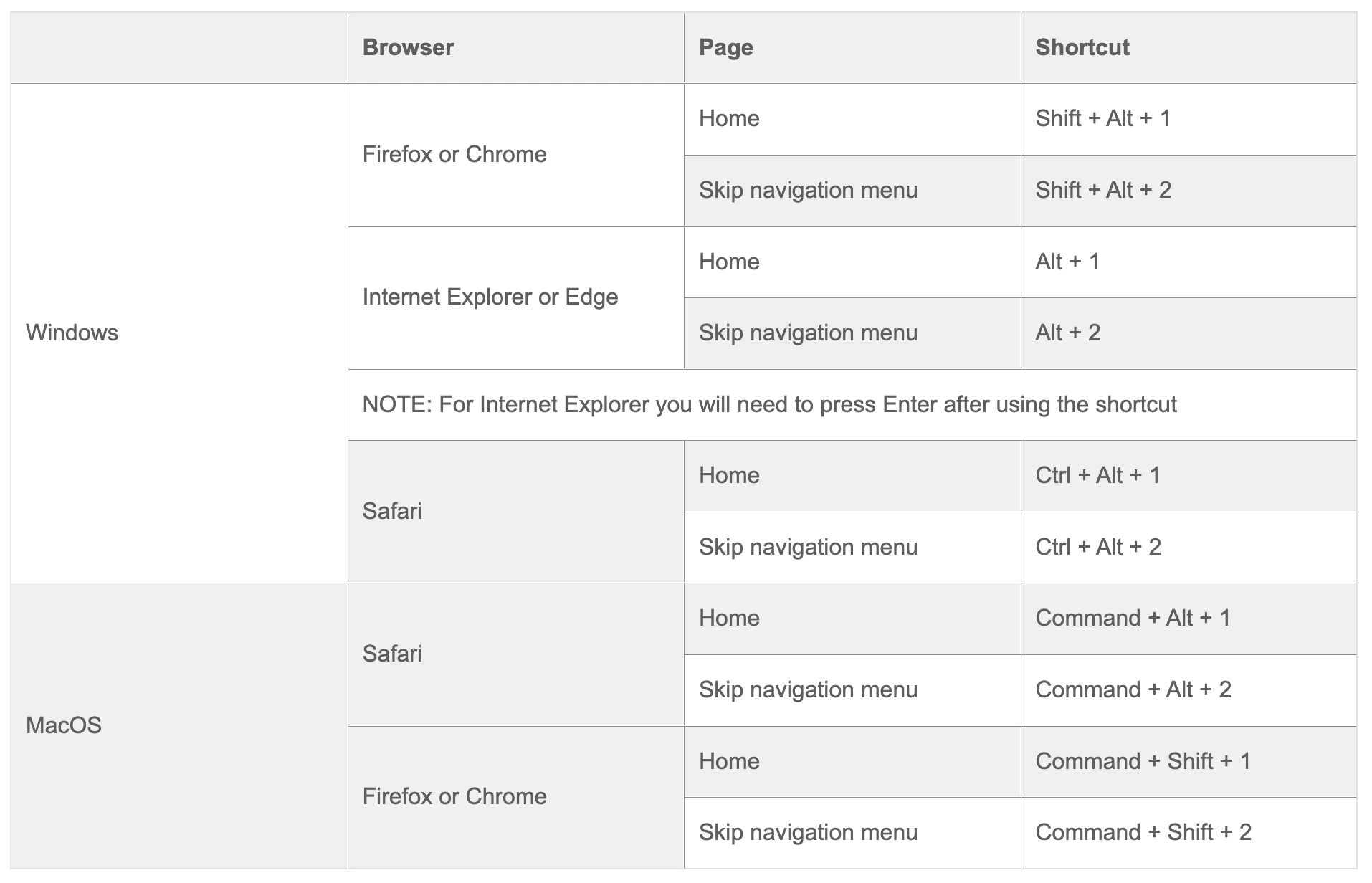
Keyboard Short Cuts / Access Keys
Different browsers use different keystrokes to activate access key shortcuts, as shown below:
Options in your browser
Most modern browsers all share the most common accessibility tools, here is a list of useful features:
Incremental Search
Incremental search allows you to progressively search a web page for a particular word or phrase on a page. To enable this on your browser, press and hold Ctrl/Command and then tap F. This will open a box to type your search into. As you type, the matches will be highlighted on the page for you.
Spatial Navigation
Hitting tab will jump you to each of the items you can interact with on any page. Holding the SHIFT key and then pressing tab will take you to the previous item.
Caret Navigation (Internet Explorer and Firefox only)
Instead of using a mouse to select text and move around within a webpage, you can use standard navigation keys on your keyboard: Home, End, Page Up, Page Down & the arrow keys. This feature is named after the caret, or cursor, that appears when you edit a document.
To turn this feature on, press the F7 key at the top of your keyboard and choose whether to enable the caret on the tab you are viewing or all your tabs.
Space bar
Pressing the space bar on a web page will move the page you are viewing down to the next visible part of the page.
Text fonts
Depending on your browser, you can override all fonts on the site to one that is easier for you to read. Options can be found in your browser's settings/preferences.
Change Font in Internet Explorer
Enlarge your view
You can activate the browser zoom via these keyboard shortcuts
Options on your computer
To zoom your entire computer screen
Apple Mac and Windows operating system both contain options to enlarge your view of your screen:
Make your computer read the site aloud
This website has been built with screen readers in mind. Menus, pictures and inputs will have the correct tags and mark up to compliment your chosen screen reader.
We have tested with following tools:

NVDA (NonVisual Desktop Access) is a free screen reader for computers running on the Windows operating system.
The latest version can be downloaded for FREE here (on this page you may be asked for a voluntary donation, if you do not wish to donate, click "skip donation this time")

WAVE is developed and made available as a free community service by WebAIM. Originally launched in 2001, WAVE has been used to evaluate the accessibility of millions of web pages. Read more here

Microsoft Windows Narrator is available in most versions of Microsoft Windows operating systems and reads text on the screen aloud and describes events like error messages so you can use your PC without a display. To find out more and how to enable it on your version, please click here
Control your computer with your voice
Apple Mac and Windows operating systems both provide ways to control your computer with voice recognition:
Third party voice recognition software is available too.
In summary
We are committed to providing you access to our most valuable resources. If you do spot anything which doesn't look quite right or have any suggestions for how we might improve our services, then please let us know.